I don't believe that this quick tip infringes on any of the terms of Entrecard, but will solve the problem (at least for some) sites where the widget can't be placed near the top of the site.
Essentially, this is an "old" HTML tip, but can be effective for use on your site.
Above your widget, place the following code: <a name="entrecard"></a>
Then, when you enter your website address your want visitors from Entrecard to go, append #entrecard to the end of it, as in http://entrecard-tips.blogspot.com/#entrecard, as this is the word contained within the shortcut.
Generally, this tip will work across all blog platforms, but there may be small changes if you want to use different text, etc. Let me know how it works and whether you see an increase in the number of clicks through your widget.
Showing posts with label Tips. Show all posts
Showing posts with label Tips. Show all posts
Sunday, December 27, 2009
Sunday, December 6, 2009
Join Entrecard and Earn 200 Credits Today
If you've never heard of Entrecard, it is a free advertising system for your blog. You join, place a widget on your blog, and visitors from the network will be able to communicate and interact with you, while you also increase traffic. As you may know, traffic is the number one way to increase conversions and profit from your site.
For a limited time only, you can join and earn 200 credits just for signing up and placing the widget on your blog. There really isn't much to lose!
For a limited time only, you can join and earn 200 credits just for signing up and placing the widget on your blog. There really isn't much to lose!
Tuesday, December 1, 2009
Just a Friendly Reminder
According to the Terms of Entrecard: "Widgets must be placed "above the fold." (No more than 850 pixels from the top of the page.)"
There have been a lot of blogs not following this as of late.
There have been a lot of blogs not following this as of late.
Tuesday, November 24, 2009
Drop Entrecards Much Faster
Flash has become a serious problem on the web as more and more sites use this technology to deliver video and advertisements. Although it is considered the industry-standard, it still isn't optimized for your browser and can cause quite a bit of problems when you browse through sites.
With Entrecard, you try to view as many sites as possible, leaving comments, and interacting with blog owners. However, Flash is quite prevalent on these sites, and can quite often cause the browser to crash, leaving any additional tabs you had opened left to crash.
There are three tools that I want to mention to help remedy this problem.
1. Flashblock - This plugin is for Firefox users, and is ideal for blocking web video. While you can also block advertisements, ads are generally not the main cause of slow browsers, but instead the large videos that are strewn throughout the sites.
2. Toggle Flash - This plugin is for Internet Explorer users, who may want to disable Flash due to its overuse on the web.
3. ClickToFlash - This is a plugin for Safari on Mac OS X in order to help you block obtrusive Flash from loading.
I want to hear your thoughts about blocking Flash when browsing sites through Entrecard, and whether it has sped up the time it takes to "drop cards" each day.
With Entrecard, you try to view as many sites as possible, leaving comments, and interacting with blog owners. However, Flash is quite prevalent on these sites, and can quite often cause the browser to crash, leaving any additional tabs you had opened left to crash.
There are three tools that I want to mention to help remedy this problem.
1. Flashblock - This plugin is for Firefox users, and is ideal for blocking web video. While you can also block advertisements, ads are generally not the main cause of slow browsers, but instead the large videos that are strewn throughout the sites.
2. Toggle Flash - This plugin is for Internet Explorer users, who may want to disable Flash due to its overuse on the web.
3. ClickToFlash - This is a plugin for Safari on Mac OS X in order to help you block obtrusive Flash from loading.
I want to hear your thoughts about blocking Flash when browsing sites through Entrecard, and whether it has sped up the time it takes to "drop cards" each day.
Sunday, November 1, 2009
Increasing Click-through to Your Widget
The Entrecard widget was designed to make it easy for others to advertise on your site and for other bloggers to earn credits/attract the blog owner to visit their site in return. However, like all bloggers, you need to increase traffic, and Entrecard's traffic can be optimized further if you follow some basic steps.
- Place the widget in an area that everyone can see it. Typically, this will be above the fold (or within 1300 pixels of the top of the page.
- Don't include too many images near the widget, or it will be harder to find when someone scrolls down your page.
- Explain to your readers what Entrecard is and how they could benefit, including a link near your widget.
- Don't necessarily use the word "ad" near the widget. People don't usually click on anything with this word, so use something more friendly like "friends" or "follow blogger." Hopefully you get the idea.
- Ensure your theme doesn't break the widget. I've noticed a few blogs that have un-responsive widgets, which are preventing the rest of the site from loading. Obviously, you are doing a disservice to your blog advertisers and those who visit your blog looking to drop.
I hope these tips have helped you, and they should address some of the issues that I've noticed across some of the blogs on Entrecard. What other tips could you suggest to increase click-through rate for either advertisers or bloggers?
Saturday, September 5, 2009
You Can Now Follow Entrecard on Twitter
It's easy to stay up-to-date with Entrecard through their dedicated Twitter account found @GetEntrecard.
Tuesday, May 12, 2009
The [Expected] Next Step
Where do you want to see Entrecard go in the future? Right now, it appears as though it is quickly stagnating as an online service. Unlike offline companies, online services always have to be rolling out new features, and that isn't the way that Entrecard is moving.
Perhaps it could be that the advertising platform didn't launch as expected, with a lot of backlash from users, at least relative to the amount of positive thoughts on it. Otherwise, there really isn't anywhere that the system could go from here. It has accomplished the community part, through forums and social media tools, and the traffic part is mostly covered, with many people thanking the service for getting them at least noticed on the internet.
However, the one thing that I think could be changed at the moment is the economy. I don't want to get into any lengthy discussion about how it should and could work, but I want to say that I am slightly disappointed in how the cashout system and the removal of credits from the system was managed.
More than anything, you want to see the number of credits removed from the system be greater than the number that is created (in order to gradually reduce the number in the system). At the current rate of credit withdrawal and the number of users who are participating in the advertisement/credit system, the ratio likely isn't good enough to maintain a course of deflation. With deflation, you'll see lower credit prices across the system, from purchasing ads on sites to buying items in the marketplace.
Something that should have been done was credit limits on daily earnings from credits. Currently, this stands at 300 per account, but unlimited if you have multiple accounts and sites. Ideally, it should probably be around 100 per account/day, or 1,000 per IP address. This will still allow people to earn a good deal of credits, but the people who would rather stick to one or two blogs will see slight reductions in the number of credits generated, because there won't be room to increase the credits unless they add another account to the site.
Another issue that I had dealing with this is the price of credits: $1 per thousand, and the rate of time that it has stayed there. Initially, it was supposed to increase and decrease with the market, but it hasn't. Why not increase it by say, $0.25/thousand every week or so, to let members decide when they want to cashout. If a large number of credits are generated on a single day (5 million, for example), then decrease the rate of payout for a certain period of time until the number of credits is reduced again.
The ideal way it should work and the way that it does are completely different and the conditions involved cannot be controlled too much without inflicting a lot of backlash from members.
What are your thoughts on the cashout system (rate) and how the economy is managed?
Perhaps it could be that the advertising platform didn't launch as expected, with a lot of backlash from users, at least relative to the amount of positive thoughts on it. Otherwise, there really isn't anywhere that the system could go from here. It has accomplished the community part, through forums and social media tools, and the traffic part is mostly covered, with many people thanking the service for getting them at least noticed on the internet.
However, the one thing that I think could be changed at the moment is the economy. I don't want to get into any lengthy discussion about how it should and could work, but I want to say that I am slightly disappointed in how the cashout system and the removal of credits from the system was managed.
More than anything, you want to see the number of credits removed from the system be greater than the number that is created (in order to gradually reduce the number in the system). At the current rate of credit withdrawal and the number of users who are participating in the advertisement/credit system, the ratio likely isn't good enough to maintain a course of deflation. With deflation, you'll see lower credit prices across the system, from purchasing ads on sites to buying items in the marketplace.
Something that should have been done was credit limits on daily earnings from credits. Currently, this stands at 300 per account, but unlimited if you have multiple accounts and sites. Ideally, it should probably be around 100 per account/day, or 1,000 per IP address. This will still allow people to earn a good deal of credits, but the people who would rather stick to one or two blogs will see slight reductions in the number of credits generated, because there won't be room to increase the credits unless they add another account to the site.
Another issue that I had dealing with this is the price of credits: $1 per thousand, and the rate of time that it has stayed there. Initially, it was supposed to increase and decrease with the market, but it hasn't. Why not increase it by say, $0.25/thousand every week or so, to let members decide when they want to cashout. If a large number of credits are generated on a single day (5 million, for example), then decrease the rate of payout for a certain period of time until the number of credits is reduced again.
The ideal way it should work and the way that it does are completely different and the conditions involved cannot be controlled too much without inflicting a lot of backlash from members.
What are your thoughts on the cashout system (rate) and how the economy is managed?
Saturday, May 2, 2009
Fixing the Entrecard Toolbar
impNERD has a tutorial on how to fix the Entrecard Toolbar from bleeding, by still displaying some text when turned off.
This is a good tutorial, albeit it may require some technical knowledge of file structures and accessing Firefox plugin customization areas, and solves the problem.
This is a good tutorial, albeit it may require some technical knowledge of file structures and accessing Firefox plugin customization areas, and solves the problem.
Thursday, April 9, 2009
Disputes within Entrecard
Several of the recent announcements and launches at Entrecard have caused disputes within the system. At times, it appears as though the members could care less about whether Entrecard remains in operation, while others remain devoted to the system.
I also want to clear up some issues. I want to stress that I am divided on some of these and have different feelings about which side of the fence I am on.
Value of Dropping Credits - There is no reason to stop visiting other blogs and earning credits this way. Even though you can't travel from one blog to the next through the widget unless you look at the status bar link, Entrecard is still rooted in providing traffic to members of its service.
The Ad Approval Process - Even though all ads have to be manually approved, some members have felt that some shouldn't have made it through the system. The simple matter here was that you are in full control of ads, and you are free to approve or deny them as you wish. The site might have contained content or beliefs that you might not have approved of, but they are the thoughts of one member.

Paid Ads versus Credits - Paid ads are placed on blogs by advertisers and advertisements that display at the top of your queue, which have been paid for by other members through the credit system. There may not be a sharp distinction between the two at this time, in terms of how they are displayed on your blog, but one is "paid" and one is "free."
Time Concerns - I can see where people had a hard time dealing withe the large number of ads in the Dashboard, especially if a large number enters between logins. However, in the long-term, you'll get more back as you continue to approve ads.
Rotation - Although all ads rotate that you place, other than through Entrecard credits, you will still receive the number of clicks or impressions that you have. It is a different situation than purchasing an ad on a single site, as they will be distributed throughout the network or by a category that you specify. When there are more ads, it will just take longer for your ad to be displayed, although you have to look at the entire category/network and how often your ad is being displayed - likely on multiple blogs.
The 50/50 Split - Separation between paid/credit ads has to be made, and this is a concern that many people have expressed. There are those people who are able to pay to have their ad displayed that isn't really a blog, while others put work into their blog, dropping, and commenting on other blogs day in and day out (often paying in excess of two thousand credits) to advertise on that blog for one day.
The 'Spam' Ads - Some users have complained about "ad" sites appearing. A third-party ad network allows ads from anyone, not just blogs. Even though many of these sites are really just affiliate ads, many could still be run by bloggers that you have commented on. Look at Google AdWords/AdSense, and you'll find a similar case.
[My Complaint] - The number of SPAM BLOGS in the network is still extremely high. Unless you stick with sites that have a daily price of at least 128 (or so) credits, the content has typically been copied, the person never signs into their dashboard and drops, or the widget isn't on the blog. This means that the top blogs will continue to receive a majority of the traffic, and trying to "give" traffic to smaller blogs is nearly impossible due to the fact that 60% of the sites in the "random" or "cheap" categories don't contain a widget, are full of ads, or redirect to another site.
Any further disputes will be added to the post. I'd like to hear more of what you think about the changes - whether they are for better or worse.
I also want to clear up some issues. I want to stress that I am divided on some of these and have different feelings about which side of the fence I am on.
Value of Dropping Credits - There is no reason to stop visiting other blogs and earning credits this way. Even though you can't travel from one blog to the next through the widget unless you look at the status bar link, Entrecard is still rooted in providing traffic to members of its service.
The Ad Approval Process - Even though all ads have to be manually approved, some members have felt that some shouldn't have made it through the system. The simple matter here was that you are in full control of ads, and you are free to approve or deny them as you wish. The site might have contained content or beliefs that you might not have approved of, but they are the thoughts of one member.
Paid Ads versus Credits - Paid ads are placed on blogs by advertisers and advertisements that display at the top of your queue, which have been paid for by other members through the credit system. There may not be a sharp distinction between the two at this time, in terms of how they are displayed on your blog, but one is "paid" and one is "free."
Time Concerns - I can see where people had a hard time dealing withe the large number of ads in the Dashboard, especially if a large number enters between logins. However, in the long-term, you'll get more back as you continue to approve ads.
Rotation - Although all ads rotate that you place, other than through Entrecard credits, you will still receive the number of clicks or impressions that you have. It is a different situation than purchasing an ad on a single site, as they will be distributed throughout the network or by a category that you specify. When there are more ads, it will just take longer for your ad to be displayed, although you have to look at the entire category/network and how often your ad is being displayed - likely on multiple blogs.
The 50/50 Split - Separation between paid/credit ads has to be made, and this is a concern that many people have expressed. There are those people who are able to pay to have their ad displayed that isn't really a blog, while others put work into their blog, dropping, and commenting on other blogs day in and day out (often paying in excess of two thousand credits) to advertise on that blog for one day.
The 'Spam' Ads - Some users have complained about "ad" sites appearing. A third-party ad network allows ads from anyone, not just blogs. Even though many of these sites are really just affiliate ads, many could still be run by bloggers that you have commented on. Look at Google AdWords/AdSense, and you'll find a similar case.
[My Complaint] - The number of SPAM BLOGS in the network is still extremely high. Unless you stick with sites that have a daily price of at least 128 (or so) credits, the content has typically been copied, the person never signs into their dashboard and drops, or the widget isn't on the blog. This means that the top blogs will continue to receive a majority of the traffic, and trying to "give" traffic to smaller blogs is nearly impossible due to the fact that 60% of the sites in the "random" or "cheap" categories don't contain a widget, are full of ads, or redirect to another site.
Any further disputes will be added to the post. I'd like to hear more of what you think about the changes - whether they are for better or worse.
Saturday, March 28, 2009
Reducing Bounce Rate
Yesterday's post proved that Entrecard's traffic has little differences between regular traffic from other sources, including search engines, referring sites, and direct traffic. The difference across most sites is within the +/- 10% range, which isn't a huge difference as many first made it out to be.
There are several steps that you can take to reduce your bounce rate. Some of them are quite obvious, while others may take some more work on your part to implement. Please remember that these are general tips and cannot be applied to all blogs and websites.
The main goal here is to actively engage your readers more, "forcing" them to stay on your website for a longer period of time and browse multiple pages/internal links.
Here are several ways to do it:
There are several steps that you can take to reduce your bounce rate. Some of them are quite obvious, while others may take some more work on your part to implement. Please remember that these are general tips and cannot be applied to all blogs and websites.
The main goal here is to actively engage your readers more, "forcing" them to stay on your website for a longer period of time and browse multiple pages/internal links.
Here are several ways to do it:
- Remove some of the content from your home or root page. This is the page that is generally linked to your Entrecard profile, so you want to "make" it so visitors travel to other pages within your site. You could start with your profile or about statement, placing it at blogname.com/about or whatever URL your blog host permits.
- Increase the number of internal, rather than external links on your homepage. Even ads can increase your bounce rate, as people may be interested in that ad, rather than content on your site. Another way to increase internal links is by placing more posts on the homepage (see next step).
- Post excerpts often decrease bounce rate, as people who want to read your content must click through to the post. Secondly, make it so people must click on the post title to view comments, which sends an additional reload message to the server (reducing bounce rate).
- Appeal to your visitors. If you don't have content that people want to read, why should they even consider clicking through to other articles, reading what you have to say?
- Reduce the number of ads on your site. One of the major problems with blogs in the Entrecard network is the relatively high percentage of blogs with a huge number of ads on them. This detracts from the value of your blog and places more emphasis on how many ads you can fit into a particular space, rather than the content that you have produced.
- Change the layout of your site.
Despite the fact that bounce rates might increase slightly due to the above-the-fold rule, you shouldn't see any significant changes as these new rules have been put in place. As long as your try to make a difference in how people use your site, you will be able to reduce bounce rate dramatically and drastically, even if it does take some time.
The best approach to doing this is to change and evolve your blog gradually, experimenting with what works and what doesn't. If using Google Analytics, set up goals that you want to achieve, as it'll help track down to the minute that you achieve them methods of improving and how much further you need to go.
Friday, March 27, 2009
Entrecard Traffic - The Bounce Rate Myth
I often become frustrated when bloggers in the Entrecard network complain about bounce rate. Think about it: when you are rewarded (through credits) for visiting others' sites, your visitors will generally try to accumulate more credits in a shorter period of time. Any other site with a similar purpose will garner a bounce rate that is high, too. You aren't going to see a drastic reduction to 50% or less bounce rate just because you become a member of a blog network and place their widget or participate in their site's features.
Blogs will likely have a higher bounce rate than other, more traditional sites. A blog features multiple forms of content on the main page, including up to ten or so recent posts, which is the main area that readers look at when visiting your blog. Secondly, many people have placed an "about" statement or area in their sidebar, again reducing the number of people who click through to other pages.
When a user clicks through your blog, they have "reduced" the bounce rate of your site, as they are reducing the number of people who have left your site after entering it. The main areas that a user would view are: additional pages of your blog, other posts (archives), or a link to view the comments. The more frequently you can get them to do this, the higher the pages/visit count rises. I'll be covering several ways of reducing bounce rate in this sense in an upcoming post.
Let's now look at the true definition of bounce rate, as per Wikipedia.
What This All Means
Looking at the bounce rates between all traffic and that of Entrecard, there is little to no difference. Unlike what most people think, Entrecard traffic is not vastly different from that of all other sources, and can even be better than traffic form independent blogs or search engines.
All things considered, the only significant difference between the various usage elements was time on site, which shouldn't come as a surprise. This means that between dropping, the average person spends thirty seconds on your site, reading content, waiting for the page to load, or going elsewhere.
Conclusion
Entrecard helps connect blog owners and their blogs together, so it is obvious that unless you have a blog that appeals to other people, you will not be able to reduce your bounce rate or increase the subscriber level of your blog.
Compare your blog's traffic from Entrecard to that of other sources - what do you see?
Blogs will likely have a higher bounce rate than other, more traditional sites. A blog features multiple forms of content on the main page, including up to ten or so recent posts, which is the main area that readers look at when visiting your blog. Secondly, many people have placed an "about" statement or area in their sidebar, again reducing the number of people who click through to other pages.
When a user clicks through your blog, they have "reduced" the bounce rate of your site, as they are reducing the number of people who have left your site after entering it. The main areas that a user would view are: additional pages of your blog, other posts (archives), or a link to view the comments. The more frequently you can get them to do this, the higher the pages/visit count rises. I'll be covering several ways of reducing bounce rate in this sense in an upcoming post.
Let's now look at the true definition of bounce rate, as per Wikipedia.
- Clicking on a link to a page on a different website, closing an open window or tab, typing in a new URL, clicking the "Back" button to leave the site, and a session timeout (staying on the page for greater than 30 minutes) are all considered "bounces."
- Bounce rate is equal to the number of single page accesses and entries.
- An analytics specialist says that it is "really hard to get a bounce rate under 20%, anything over 35% is cause for concern, 50% (above) is worrying."
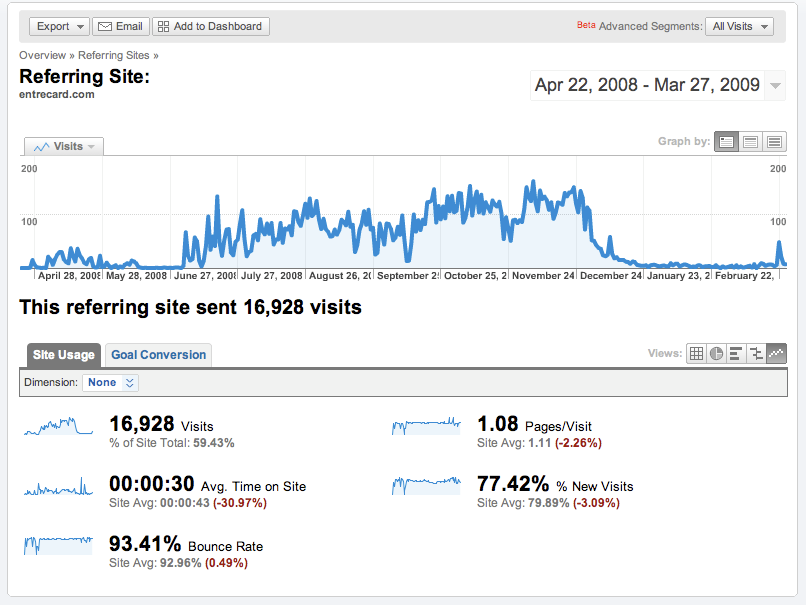
Now that we have the definition of a bounce rate, let's look at the traffic from Entrecard compared to other referring sites and search engines. I've attached an image, which shows the main detailed overview of the traffic with this blog.

Please Note: This blog may not fill the "average" of all blogs in the network or throughout the web - we cater to Entrecard users or people who may want to become members. Therefore, there is less traffic from multiple referring sites, and more from Entrecard. The main promotion method of this blog is through Entrecard and I have only spent time "dropping" on other sites to accumulate the traffic.
I will consider a variation of greater than 5% a "difference" between Entrecard traffic and "normal" traffic.
The largest single referrer for my blog is the Entrecard Category Browser, which is surprising, as most would think of the Inbox as the main area for traveling to other sites. Following this first referral path, detailed pages for my blog, and Inboxes for specific members are listed (with 2,137 paths to the Entrecard.com site, the total number of inbox visits is likely greater than that of the Browser). In some ways, you can track all the way down to the particular members, and how often they visit your blog.
Some Statistics for Comparison
– Between April 22, 2008 and March 27, 2009, Entrecard sent 16,928 visits to the site.
Please Note: This blog may not fill the "average" of all blogs in the network or throughout the web - we cater to Entrecard users or people who may want to become members. Therefore, there is less traffic from multiple referring sites, and more from Entrecard. The main promotion method of this blog is through Entrecard and I have only spent time "dropping" on other sites to accumulate the traffic.
I will consider a variation of greater than 5% a "difference" between Entrecard traffic and "normal" traffic.
The largest single referrer for my blog is the Entrecard Category Browser, which is surprising, as most would think of the Inbox as the main area for traveling to other sites. Following this first referral path, detailed pages for my blog, and Inboxes for specific members are listed (with 2,137 paths to the Entrecard.com site, the total number of inbox visits is likely greater than that of the Browser). In some ways, you can track all the way down to the particular members, and how often they visit your blog.
Some Statistics for Comparison
– Between April 22, 2008 and March 27, 2009, Entrecard sent 16,928 visits to the site.
– This accounts for 59.43% of the total site traffic.
– Pages per visit with Entrecard is 1.08, 2.26% less than the site average of 1.11.
– Average time on site is 30.97% less than the entire site average, at 00:00:30 versus 00:00:43.
– % New Visits (a greater percentage shows loyalty) is 77.42%, 3.09% lower than the site average of 79.89%.
– Bounce rate through Entrecard is 93.41%, 0.49% higher than the site average at 92.96%.
– 85 of 119 traffic sources reported a bounce rate of 100%.
What This All Means
Looking at the bounce rates between all traffic and that of Entrecard, there is little to no difference. Unlike what most people think, Entrecard traffic is not vastly different from that of all other sources, and can even be better than traffic form independent blogs or search engines.
All things considered, the only significant difference between the various usage elements was time on site, which shouldn't come as a surprise. This means that between dropping, the average person spends thirty seconds on your site, reading content, waiting for the page to load, or going elsewhere.
Conclusion
Entrecard helps connect blog owners and their blogs together, so it is obvious that unless you have a blog that appeals to other people, you will not be able to reduce your bounce rate or increase the subscriber level of your blog.
Compare your blog's traffic from Entrecard to that of other sources - what do you see?
Thursday, March 19, 2009
Help with the Entrecard Market
It's now been more than a month since the Entrecard Market was launched, and there are quite a number of listings in there. Because it has been a rather decent amount of time to determine what is available and what isn't, I'd like to make some comments on the system and give you an idea on how to extend your reach using the system.

Be sure that you are logged in before reading this - this is a guide through the Marketplace area.
Everyone that is a member of Entrecard is automatically able to add listings, unless of course you have been banned from using the area. In most cases, you will be able to post an "unlimited' number of listings, meaning that you are able to earn an unlimited number of credits, depending on how much members are willing to spend and how inflated/deflated the value of credits is.
Assuming that there is a fluctuating value of credits when the new exchange system is officially launched, the Market should become a more viable area for people to earn credits and have a real value for what they are exchanging with other members. At this point, it is a "free" market, in that no money is spent, simply the time that you spent trying to earn credits. For this reason, not many high-value items have been placed into the system, other than a few odds and ends. This isn't to say that there aren't some more valuable items, like homemade creations that the person selling the item has to pay for materials and shipping costs, while the buyer only has to spend credits.
What People are Selling
At this time, the largest area for sellers is clearly 'Advertising,' which has many marketing services mixed in, like StumbleUpon submissions, Diggs, etc. There are more than five pages in this area of listings (approximately 240 listings), more than double the next largest area, 'Services,' which has similar items. Nearly every other category may only have a small number of listings, and this is to be expected by what the costs versus return value is.
Most Popular Areas
There are three areas that you can see the most popular items, starting with the category view, and the listings on each page. At the top of each page, you will see some higher-valued items, while at the bottom some Staff Favorites are chosen in each category. However, this is placed towards the bottom, so they probably don't get the extra views that they should or want to get.
The Top Sellers have up to 37 items in the marketplace, and this will likely grow with more consistent numbers if more members see the marketplace as a way to earn extra credits - translating into cash in the future. For example, while eBay or other online bidding/selling services offer the ability to market your service to others, there are often large selling fees and shipping costs that you must pay. With Entrecard, you can set the price at any height, and there will likely be someone that comes along and wants to purchase it. This will likely go into more effect once the conversion service starts.
Looking over the list of most popular items, StumbleUpon posts, blog visits, and Diggs are the top items, while the most popular category, Advertising-related items doesn't appear too frequently in this area. Perhaps this will change in the future.
Getting Listed
On the main page, to start listing an item, go to the right panel, click 'Add a listing' and proceed to add the information related to the item.
You will need the following to get started:
Check the listing to be sure that all details are correct. You can change them at any time, although you wouldn't want to change them too dramatically after people have seen the item.
Returning back to the main area, you can view listings - clicking on a listing will bring up an area that allows you to "Feature this listing' - found in the sidebar panel.
Front Page, Top - 1,995 credits/week - The premium spot, this places your 150x100 pixel advert right at the top of the front market page and your category page, and gives you the featured star in listings. (currently sold out).
Front Page, Center - 995 credits/week - Places your 120x90 pixel advert in the middle of the front market page and gives you the featured star in listings.
Category Page, Top - 995 credits/week - Places your 150x100 pixel advert right at the top of your category page, and gives you the featured star in listings.
Featured - 45 credits/week - Marks your listing with the featured star.
These will all simply give you a more prominent location in the listings area, but doesn't really expose your listing to all members, other than those visiting the marketplace area.
When an item does sell, you have several options, which help give you some control over whether someone has paid and when you should begin 'shipping' an item. Remember that there is a tax applied for orders to maintain some level of control over credits.
Conclusion
If you have any other further questions or comments, please address them below. I'd like to hear some of your feedback and experience with the Market system and whether your items have/have not sold.
It is still in "beta" at the moment, so new features could be added in the upcoming time frame.
Be sure that you are logged in before reading this - this is a guide through the Marketplace area.
Everyone that is a member of Entrecard is automatically able to add listings, unless of course you have been banned from using the area. In most cases, you will be able to post an "unlimited' number of listings, meaning that you are able to earn an unlimited number of credits, depending on how much members are willing to spend and how inflated/deflated the value of credits is.
Assuming that there is a fluctuating value of credits when the new exchange system is officially launched, the Market should become a more viable area for people to earn credits and have a real value for what they are exchanging with other members. At this point, it is a "free" market, in that no money is spent, simply the time that you spent trying to earn credits. For this reason, not many high-value items have been placed into the system, other than a few odds and ends. This isn't to say that there aren't some more valuable items, like homemade creations that the person selling the item has to pay for materials and shipping costs, while the buyer only has to spend credits.
What People are Selling
At this time, the largest area for sellers is clearly 'Advertising,' which has many marketing services mixed in, like StumbleUpon submissions, Diggs, etc. There are more than five pages in this area of listings (approximately 240 listings), more than double the next largest area, 'Services,' which has similar items. Nearly every other category may only have a small number of listings, and this is to be expected by what the costs versus return value is.
Most Popular Areas
There are three areas that you can see the most popular items, starting with the category view, and the listings on each page. At the top of each page, you will see some higher-valued items, while at the bottom some Staff Favorites are chosen in each category. However, this is placed towards the bottom, so they probably don't get the extra views that they should or want to get.
The Top Sellers have up to 37 items in the marketplace, and this will likely grow with more consistent numbers if more members see the marketplace as a way to earn extra credits - translating into cash in the future. For example, while eBay or other online bidding/selling services offer the ability to market your service to others, there are often large selling fees and shipping costs that you must pay. With Entrecard, you can set the price at any height, and there will likely be someone that comes along and wants to purchase it. This will likely go into more effect once the conversion service starts.
Looking over the list of most popular items, StumbleUpon posts, blog visits, and Diggs are the top items, while the most popular category, Advertising-related items doesn't appear too frequently in this area. Perhaps this will change in the future.
Getting Listed
On the main page, to start listing an item, go to the right panel, click 'Add a listing' and proceed to add the information related to the item.
You will need the following to get started:
- Title
- Description
- Category
- Delivery Details - Details a buyer must provide for you to correctly deliver the product/service.
- Price - Price in Entrecard credits per item.
- Stock - Number of items you have or are able to sell.
- Small Image - A 64x64 image of the item.
- Profile Image - A 300x200 image of the item or a larger snapshot.
Check the listing to be sure that all details are correct. You can change them at any time, although you wouldn't want to change them too dramatically after people have seen the item.
Returning back to the main area, you can view listings - clicking on a listing will bring up an area that allows you to "Feature this listing' - found in the sidebar panel.
Front Page, Top - 1,995 credits/week - The premium spot, this places your 150x100 pixel advert right at the top of the front market page and your category page, and gives you the featured star in listings. (currently sold out).
Front Page, Center - 995 credits/week - Places your 120x90 pixel advert in the middle of the front market page and gives you the featured star in listings.
Category Page, Top - 995 credits/week - Places your 150x100 pixel advert right at the top of your category page, and gives you the featured star in listings.
Featured - 45 credits/week - Marks your listing with the featured star.
These will all simply give you a more prominent location in the listings area, but doesn't really expose your listing to all members, other than those visiting the marketplace area.
When an item does sell, you have several options, which help give you some control over whether someone has paid and when you should begin 'shipping' an item. Remember that there is a tax applied for orders to maintain some level of control over credits.
Conclusion
If you have any other further questions or comments, please address them below. I'd like to hear some of your feedback and experience with the Market system and whether your items have/have not sold.
It is still in "beta" at the moment, so new features could be added in the upcoming time frame.
Wednesday, January 28, 2009
How to Maximize Entrecard
While some people think that using Entrecard is a waste of time, how much time would you have to spend to get the same amount of free traffic elsewhere? It is likely that you would have to spend time leaving comments, joining discussion boards, and emailing other people to "look" at your blog.
The truth of the matter is that Entrecard is one source of traffic for your blog. Although it can be said that it is more of a blog network and directory, there have been tools introduced (and more may be introduced) that make it more beneficial than these other methods, which all, separated, leave very little impact on your traffic.
Yes, you could leave a comment or a trackback on a popular blog, but you could advertise on a somewhat popular blog through Entrecard and receive more traffic than that comment/other method would ever deliver. Plus, you have more control over which sites you advertise on and how you interact with other members.
Compared to MyBlogLog or Blog Catalog, which are sometimes considered indirect "competitors" to Entrecard, you see more traffic through Entrecard and more overall benefits for the time and/or effort you put in.
When you think about it, Entrecard is just a service that, when used properly, is designed to help bring visitors to your blog. No promises are made, although they are sometimes implied. But like all other companies, they have to draw in visitors and new members to their site to remain in operation.
The truth of the matter is that Entrecard is one source of traffic for your blog. Although it can be said that it is more of a blog network and directory, there have been tools introduced (and more may be introduced) that make it more beneficial than these other methods, which all, separated, leave very little impact on your traffic.
Yes, you could leave a comment or a trackback on a popular blog, but you could advertise on a somewhat popular blog through Entrecard and receive more traffic than that comment/other method would ever deliver. Plus, you have more control over which sites you advertise on and how you interact with other members.
Compared to MyBlogLog or Blog Catalog, which are sometimes considered indirect "competitors" to Entrecard, you see more traffic through Entrecard and more overall benefits for the time and/or effort you put in.
When you think about it, Entrecard is just a service that, when used properly, is designed to help bring visitors to your blog. No promises are made, although they are sometimes implied. But like all other companies, they have to draw in visitors and new members to their site to remain in operation.
Wednesday, December 31, 2008
Why You Should Introduce Others to Entrecard
Spend one hour creating a post explaining how to use Entrecard and you will be rewarded immensely in the long-term for this little act.
People who visit your blog, either from search engines or natural discovery using the search box on your site or browsing the archives will likely land upon this post and see the advantages of using the service. Then, when you "refer" them to it, they will likely (although not always) come back to your site for further updates, new tips, information, or even to ask a question (as you're the one who has been using the service for a longer period of time).
However, you have to be aware that not everyone visiting your site will take advantage of the review (or they will use you their advantage), so you have to keep the review as basic, sticking to the fundamentals of the program. In my opinion, a large percentage of people with "inside" information never expose the fine details, or everyone else will be able to replicate those results on their own end, possibly becoming more successful than the person(s) who leaded those secrets.
When you employ this basic approach on your website, people will discover how to use Entrecard and may even continue visiting your blog repeatedly in the upcoming period.
After all, it's worth a try and there is little to lose.
People who visit your blog, either from search engines or natural discovery using the search box on your site or browsing the archives will likely land upon this post and see the advantages of using the service. Then, when you "refer" them to it, they will likely (although not always) come back to your site for further updates, new tips, information, or even to ask a question (as you're the one who has been using the service for a longer period of time).
However, you have to be aware that not everyone visiting your site will take advantage of the review (or they will use you their advantage), so you have to keep the review as basic, sticking to the fundamentals of the program. In my opinion, a large percentage of people with "inside" information never expose the fine details, or everyone else will be able to replicate those results on their own end, possibly becoming more successful than the person(s) who leaded those secrets.
When you employ this basic approach on your website, people will discover how to use Entrecard and may even continue visiting your blog repeatedly in the upcoming period.
After all, it's worth a try and there is little to lose.
Friday, December 26, 2008
Entrecard Reviews and Tutorials
Below you'll find some videos that have been posted on YouTube as well as introduction videos from the Entrecard team. There may be others, so feel free to suggest them. If you have become familiar with how Entrecard works, these videos aren't necessarily for you, but provide new readers some tips on how to use the site.
Traffic with Entrecard
Entrecard Review
Entrecard (Introduction)
Free Traffic and Advertising Using Entrecard
Promotional Video
Traffic with Entrecard
Entrecard Review
Entrecard (Introduction)
Free Traffic and Advertising Using Entrecard
Promotional Video
Sunday, December 7, 2008
Share Your Twitter Tips and Follow Each Other
Over the next few days, the Entrecard blog will be swarming with new Entrecard tips and suggestions from other members. You can share your tips right now or make suggestions in the specific forum.
At this time, you are also suggested to share your Twitter profile in order to have others follow you. Nearly two hundred people have already done this, so you should too!
You can do that at this blog post. However, you are also suggested to "follow" other members, in order to make the whole experiment work the way it is supposed to - allowing more people to become familiar with one another through other social networking sites.
At this time, you are also suggested to share your Twitter profile in order to have others follow you. Nearly two hundred people have already done this, so you should too!
You can do that at this blog post. However, you are also suggested to "follow" other members, in order to make the whole experiment work the way it is supposed to - allowing more people to become familiar with one another through other social networking sites.
Saturday, December 6, 2008
Using Entrecard: How to Build Your Social Profile
Now, let's get this straight: You cannot directly link your Entrecard link to your Facebook, MySpace, or Twitter profile/page, but you can still use it to promote these services and gain new followers.
Let's assume that you have a few followers, but nowhere near the same following that the well-known people of the well-established sites have. This means you still have room to grow, but aren't so unknown that you don't have any people subscribed to your "activities." Everyone wants more friends - this is how to do add more using Entrecard.
Ideally, you should have a "personal" blog in which it would normally be customary to blog about your other social media profiles on the Internet. Otherwise, you shouldn't be using such a large marketing ploy simply to promote a single profile or two on your blog.
The first step in promoting your social media profile (using Entrecard as a sub-method) is by directly calling attention to the people who have found your site through Entrecard. There are plugins that allow you to do this, which detect the referring site, otherwise you should simply be using standard, static text promotes your social profile to these users.
Other ways of promoting your blog (with traffic from Entrecard) would be through the all-in-one plugins/widgets like the one currently in use, that make it easier to share your blog/individual posts, creating a more uniform connection and interaction base between your site and other profiles. In addition, you could try promoting a separate feed or newsletter only for members of Entrecard (if enough of your readership is through the service), providing them with information related to updates elsewhere.
By directly promoting your product to Entrecard visitors, you will be able to increase your "following" on these sites, while also increasing your freed readership.
What are your thoughts?
Have you seen any increase in Twitter/Facebook/etc. subscribers/friends with the increase in Entrecard traffic or has growth remained natural?
Let's assume that you have a few followers, but nowhere near the same following that the well-known people of the well-established sites have. This means you still have room to grow, but aren't so unknown that you don't have any people subscribed to your "activities." Everyone wants more friends - this is how to do add more using Entrecard.
Ideally, you should have a "personal" blog in which it would normally be customary to blog about your other social media profiles on the Internet. Otherwise, you shouldn't be using such a large marketing ploy simply to promote a single profile or two on your blog.
The first step in promoting your social media profile (using Entrecard as a sub-method) is by directly calling attention to the people who have found your site through Entrecard. There are plugins that allow you to do this, which detect the referring site, otherwise you should simply be using standard, static text promotes your social profile to these users.
Other ways of promoting your blog (with traffic from Entrecard) would be through the all-in-one plugins/widgets like the one currently in use, that make it easier to share your blog/individual posts, creating a more uniform connection and interaction base between your site and other profiles. In addition, you could try promoting a separate feed or newsletter only for members of Entrecard (if enough of your readership is through the service), providing them with information related to updates elsewhere.
By directly promoting your product to Entrecard visitors, you will be able to increase your "following" on these sites, while also increasing your freed readership.
What are your thoughts?
Have you seen any increase in Twitter/Facebook/etc. subscribers/friends with the increase in Entrecard traffic or has growth remained natural?
Friday, November 28, 2008
Use or Accumulate Credits?
There are some people using Entrecard that use the system faithfully, day in and day out, who are able to quickly accumulate their credits, saving them until they have a few thousand. At this point, some of them go on a spending spree (if they already haven't), or continue saving their credits.
Which direction is best for you?
Depending on your site or the features that Entrecard might roll out in the future (it is planned that the Marketplace will re-open with the option of selling credits for cash or other goods), you can choose multiple directions, which will be outlined below. Now, I can only suggest general directions, as it is important to balance this depending on the critical factors put into place with your blog. In other words, it's the ways that you save and manage your credits.
Which direction is best for you?
Depending on your site or the features that Entrecard might roll out in the future (it is planned that the Marketplace will re-open with the option of selling credits for cash or other goods), you can choose multiple directions, which will be outlined below. Now, I can only suggest general directions, as it is important to balance this depending on the critical factors put into place with your blog. In other words, it's the ways that you save and manage your credits.
- No Dropping/Direct Earning - You will only be using credits that you have earned through advertisers on your widget, creating new posts, etc.
- Drop, then Use Credits - You will earn credits through dropping and all other sources, but then use them nearly immediately to purchase advertising spots on other sites. In some cases, you will save a few hundred to purchase higher-priced ad slots.
- Saving Credits - All (or nearly all) credits that you have earned will be saved into your account, possibly for future use.
Which of these methods do you employ on your blog/site to achieve the best results?
Tuesday, November 25, 2008
Using Entrecard: How to Market an eBook
Note: Please make sure that the following tips are not against the terms of Entrecard before using them, or you may see your account suspended. As long as the widget is on a page that contains text, linking to a 'quality' blog, you shouldn't have any major problems.
There have been a number of people on Entrecard that have been using their widget to promote services that they have created - in this case, we'll review how to market eBooks and other forms of digital good (specifically textual) through Entrecard.
Because Entrecard allows you to link to individual pages (be sure the widget and quality adheres to this page as well as the rest of your blog), you will be able to promote your eBook directly through Entrecard.
In short, here's how it's done:
If you don't receive at least some return on your eBook in terms of downloads, it might be time to take a different approach to marketing your product. It is to be a product that is unique, so readers will find value in it. Otherwise, you are simply promoting something that people already know how to do or have already downloaded/purchased before.
While these are some general tips on how to begin marketing your new eBook through Entrecard, there are many different avenues that you can explore in terms of how to use the powerful system, with more to be exposed in the near future.
What are your thoughts on marketing a single product (i.e. an eBook through Entrecard)? Have you ever tried it — what were your results?
There have been a number of people on Entrecard that have been using their widget to promote services that they have created - in this case, we'll review how to market eBooks and other forms of digital good (specifically textual) through Entrecard.
Because Entrecard allows you to link to individual pages (be sure the widget and quality adheres to this page as well as the rest of your blog), you will be able to promote your eBook directly through Entrecard.
In short, here's how it's done:
- Create an eBook or other product that focuses on a subject oriented around your blog.
- Create an image that represents the product, such as an image of a book with the cover representing the book's main topic. Keep in mind that it has to scale to 125x125 pixels.
- Upload the image to Entrecard, linking to the page. You may also change the title of your blog and/or description to suit the change in where your link directs readers.
- Be sure that the page you have linked to works. In other words, it must be a "landing page" for readers to find out how to download/view the book, not simply a link in the sidebar.
- Let the readers flow in to download and view your product.
- Don't use someone else's product or an affiliate offer on your promotion page. This is strictly against the terms of Entrecard.
- Be sure that everything is complete before you transition your blog over to the "marketing" stage. You don't want any 404 errors and the like.
- Be sure that readers notice your ad - advertise throughout Entrecard - so, you'll want to accumulate quite a lot of credits before you begin.
- You shouldn't try selling your eBook (charging people to download it) through Entrecard - sales will be quite limited compared to other advertising methods.
If you don't receive at least some return on your eBook in terms of downloads, it might be time to take a different approach to marketing your product. It is to be a product that is unique, so readers will find value in it. Otherwise, you are simply promoting something that people already know how to do or have already downloaded/purchased before.
While these are some general tips on how to begin marketing your new eBook through Entrecard, there are many different avenues that you can explore in terms of how to use the powerful system, with more to be exposed in the near future.
What are your thoughts on marketing a single product (i.e. an eBook through Entrecard)? Have you ever tried it — what were your results?
Friday, November 14, 2008
A Review of the Blog Quality Standards
I'd like to take the time again to review the Blog Quality Standards, which were set forth to create the best, highest quality network of blogs - in the long run, they'll help improve the overall experience of all members.
It is important to remember them, or you run the risk of having your account deleted.
Warnings
A warning will be sent to blogs if your blog doesn't meet the Blog Quality Standards and is only a minor offense. At this stage, you'll be given 3 days (72 hours) before your entire account will be permanently deleted.
For all other, "major" offenses, your account will be immediately deleted and you won't have permission to "reactivate" it.
When Your Account is Deleted
If your blog fails to meet the standards and is deleted for whatever reason, you will receive an email from deleted@entrecard.com, which will state the reason why your account was deleted. Once you have addressed the problem (whether the deletion was in error or not), you can send a reply to the message and they will review your site/account again. If the moderators find that it has been "fixed," your account will be reopened.
At no point will they ever discuss a deleted site with other members of the site.
Main Rules
These are the main rules that you must follow in order to remain a member of the site. While not all rules are watched, many are reported by moderators/members of the site.
Illegal Activities
These activities pertain to generating credits, spamming, and "gaming" the system.
All of these standards, rules, and procedures have been set forth to ensure that the integrity of the site remains as high as possible, as well as to keep the site growing strong.
It is important to remember them, or you run the risk of having your account deleted.
Warnings
A warning will be sent to blogs if your blog doesn't meet the Blog Quality Standards and is only a minor offense. At this stage, you'll be given 3 days (72 hours) before your entire account will be permanently deleted.
For all other, "major" offenses, your account will be immediately deleted and you won't have permission to "reactivate" it.
When Your Account is Deleted
If your blog fails to meet the standards and is deleted for whatever reason, you will receive an email from deleted@entrecard.com, which will state the reason why your account was deleted. Once you have addressed the problem (whether the deletion was in error or not), you can send a reply to the message and they will review your site/account again. If the moderators find that it has been "fixed," your account will be reopened.
At no point will they ever discuss a deleted site with other members of the site.
Main Rules
These are the main rules that you must follow in order to remain a member of the site. While not all rules are watched, many are reported by moderators/members of the site.
- No Nudity - Because Entrecard is a (generally) friendly-family site, any blogs with images containing nudity in the posts or ads are not permitted.
- English Only - To maintain a "readability," your blog must be in English, otherwise use a translation plugin or write it in a different language.
- 5 Posts Minimum - To become a member, you need to have at least five posts at all times on your blog. They must have been written within the past three months.
- Original Content - You can't replicate content from other sources, which includes "free articles," from the public domain or other illegal sources, such as stolen content or scraped feeds.
- No Full-Screen Ads or Popups - Bogs that contain these will be removed as it is annoying to readers who visit your blog through the service.
- No Illegal File Downloads - You may not link to or host files that are illegal - such as music, movies, or software. You may distribute content that you have created, as long as the user opts-in to the download.
- Present Entrecard Widget - The widget is required to be on your site at all times.
- No Redirects - Your URL cannot contain redirects to any other site.
- No Duplicate Accounts - No duplicate accounts for the same blog.
- URLs Must be Valid - In other words, don't use someone else's site or a URL that directs to a non-existent site.
- No Automatically Playing Audio - People don't want to hear your music or advertisements when they visit your site. You can have video and audio, but it can't be set to automatically play.
- Recent Content - You can't have content on the main page that hasn't been updated within the past 90 days (3 months).
Additional
- No non-blogs, including directories, indexes, forums, or stores. They can be attached to your blog, but can't be used as a site connected with your widget.
- Sites cannot contain more than 50% paid content - paid posts, posts with links to online stores, or affiliate links (to keep down on spam and people who want to build dozens of sites to market through the system illegally).
These activities pertain to generating credits, spamming, and "gaming" the system.
- Using an automated program or script that does the dropping for you.
- Drops done through means in which you are not visiting the blog.
- Using the message system to send unsolicited spam to members you have had no interaction with previously.
- Using the message system to ask for recommendations or to ask for participation in a recommendation exchange.
- Harassing other members, using profanity, etc.
- Uploading a card that contains nudity, illegal activities, or is offensive to other members.
All of these standards, rules, and procedures have been set forth to ensure that the integrity of the site remains as high as possible, as well as to keep the site growing strong.
Subscribe to:
Posts (Atom)